I’m seeing companies spend lots of money trying to get customers to talk about their brands and products in social media.
For many of these companies, it’s a big waste of money.
Let’s be rational about this. What customer wants to tweet to his or her friends about toothpaste or B2B procurement services? (Please repeat after me: “None of them.”)
So what do we do when our customers just aren’t that into us? We come to grips with the fact that social media isn’t all about us, it’s all about them.Companies should be much more focused on listening to customers than they are on talking to them.
Here’s an example that I heard at a recent SAP Forum: Some Consumer Packaged Goods (CPG) companies like General Mills have invested in analyzing the social media conversations of their various target demographics. In one case the trends showed that mothers are concerned about protecting gluten-sensitive kids from getting sick. That led General Mills to begin prominently labeling its appropriate foods “gluten free,” which helped drive more sales, according to Marcus Shingles of Deloitte, who spoke at the Forum about research he has done with CPG companies about market analytics.
The increasing power of analytics should not be used with customers alone, however. We must also listen to the market,as SAP CMO Jonathan Becher pointed out recently.That means developing sophisticated analytical capabilities that enable us to make better decisions across the business. Here are some best practices that I picked up at the Forum for doing that:
Know what your competitors are doing with analytics. In CPG, for example, a few companies have constantly been pushing the envelope of analytics for decades. Now that the analytical possibilities are exploding, that’s a gap that competitors need to close—fast.
Let customers do the data gathering.Gigwalk is an example of how CPG companies can crowdsource tasks that normally cost them a fortune in employees’ time and labor. In a typical Gigwalk example, customers get a nominal fee to walk through stores and monitor things like stock outs and competitive placement.
Keep an eye on startups. Gigwalk is just one example of the many startups blooming in the fallow field of analytics. “Three or four CPG companies have worked with all of the startups,” said Shingles. “Other companies need to start doing the same if they want to keep up.”
Create an analytics sharing model. Companies need easy ways to share analytical information across the organization to improve and speed up decision making. But they also need to share analytics nerds, who are in short supply right now. Shingles recommends establishing an analytics center of excellence.
Keep the insights simple and visual. Analytics is for nerds, by nerds. To make it accessible to humans (and salespeople), put it all in a visual format—it’s how our brains like to process information.
Speed translates into margin. What good is insight if it comes too late to act? Especially in social media, companies must be ready to decide and act quickly—which means the data must be processed quickly. German home shopping network HSE24 uses real-time data from CRM and social media to determine the right up-sell and cross-sell products to offer customers while representatives have them on the phone. In another example, Fox saw that the lead ape in Rise of the Planet of the Apes was trending more on social media than the human actors. So Fox ripped down all the human posters and replaced them with shots of the ape.
What do you think? Have you stopped talking about yourself in social media yet?
By Christopher Koch, Article Source: http://www.forbes.com/sites/sap/2013/04/01/analytics-and-social-media-6-tips-for-selling-when-customers-just-arent-that-into-you/
Social media sites already offer free advertising in the form of tweets and Facebook posts, but these tools can only take your brand so far. The next step involves paying for social media ads, and if you're considering this option, you're probably most concerned with one big question: What will my return actually be? Will spending money on an ad on Twitter or Facebook bring more customers to my business than the same amount spent on Google AdWords?
I put that question to the test by setting up experimental ads across five services: Google AdWords, Facebook, Twitter, LinkedIn, and StumbleUpon. I wanted to see exactly how these tools benefited my own content-creation and corporate blogging business. Indeed, Null Media is exactly the kind of small business that could benefit from social media ads—in theory.
Google AdWords: The baseline
Google's own ad for AdWords
First, a few words about the baseline for this experiment—Google AdWords—where I had already been running ads for several months. For this test run, I raised my overall budget to $25 a day to make it comparable with the social media sites being evaluated. (See page 2 for how I tested.) I quickly discovered that my budget wasn't being exhausted because my bids were too low. By raising these bids to about $2 per click, in line with other services reviewed here, I received more traffic, but not much.
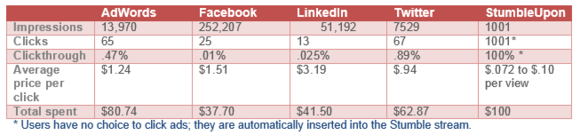
Over the course of the ad run, at both low and high bids, I received 13,970 impressions and got 65 clicks for a total of $80.74. That's an 0.47 percent clickthrough rate at an average price of $1.24 per click.
The verdict: What may sound like poor performance is actually quite good, and since those ads are delivered to people who are actively searching for terms I'm targeting with my keyword ads, that represents a worthwhile investment.
Facebook: Heavy exposure, light clickthrough
Over 1 billion served, but what about your customers?
Setting up my ad with Facebook was by far my most complicated experience with these services, although its management system and tracking services are quite powerful. The hassles began right from the beginning. I waited all day for my first ad to be approved, but it was "pending" indefinitely. I canceled it and tried again the next day, and it was abruptly approved within minutes.
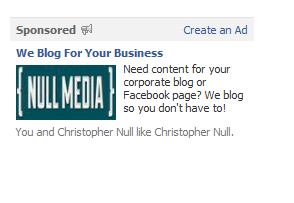
My ad on Facebook
Facebook offers both CPC (cost per click) and CPM (cost per thousand impressions) ads. I settled on a CPC ad, targeting Facebook users who expressed an interest in various business topics, with a bid of $0.15 per click. Twelve hours later, the ad had received no impressions, likely because the bid was far too low. Facebook suggested a higher bid of $0.57, which got things moving, but slowly. A day later, Facebook's reporting tool suggested an even higher bid of $1.41. Again, impressions increased, but not clicks. Another day later, I raised the bid yet again to $2, at which point Facebook suggested a bid between $2.58 and a whopping $7.30 per click.
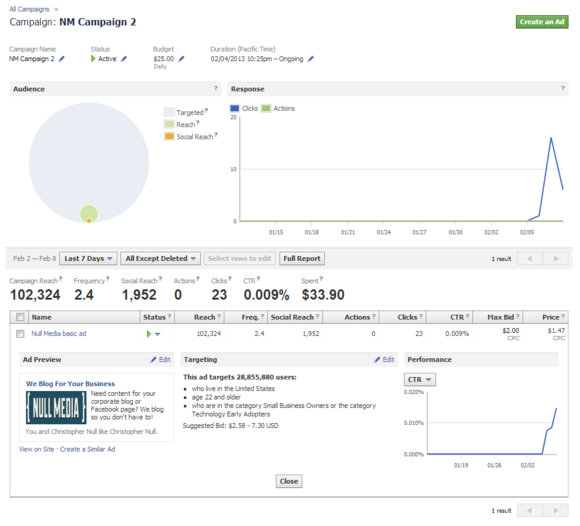
The final ad results from Facebook.
What was going on here? I'm still baffled. Is Facebook's ad bidding a bait-and-switch system or just bad programming? Regardless of how much you pay, Facebook encourages you to pay even more. Yes, higher bids result in additional clicks because your ad is displayed more often, but shouldn't Facebook's system be smarter about its recommendations?
After four days, the numbers were in, at a mammoth 253,207 impressions and a mere 25 clicks. The total clickthrough rate was an infinitesimal 0.01 percent, at a total expense of $37.70. That works out to an average CPC of $1.51.
The verdict: The numbers aren't terrible, and the heavy exposure, even without many clicks, is worth something. However, the scant number of actual visits makes me wonder if Facebook was the wrong venue for this ad. (My business page did, however, get one extra "Like" during the ad run.)
LinkedIn: Making impressions, not leads
LinkedIn makes a special pitch for SMBs.
I'm advertising a B2B service, so LinkedIn sounded like a perfect match. Like Facebook, LinkedIn offers both CPM and CPC ads, so I gave a CPM ad a whirl for my first day, bidding the minimum allowed rate of $2 per 1000 impressions, targeting a fairly broad segment of LinkedIn users with job descriptions relevant to my product.
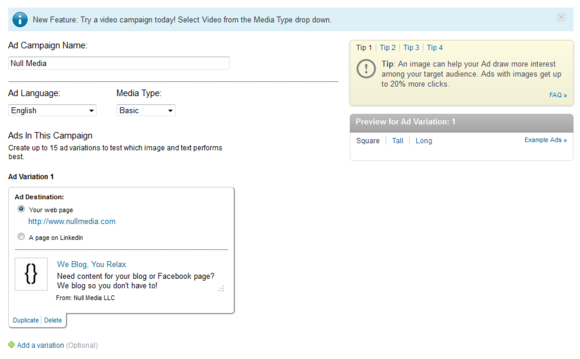
My final LinkedIn ad.
My ad began showing within about 10 minutes, and took off. I hit my $25 limit within an hour. The results for this first day were 13,643 impressions and 6 clicks, for a 0.044 percent clickthrough rate and a whopping $4.17 CPC.
The CPM ad did not feel cost-effective, so I switched to a $2 CPC bid and turned on the "Collect Leads" option, which encourages people who click on your ad to provide contact information.
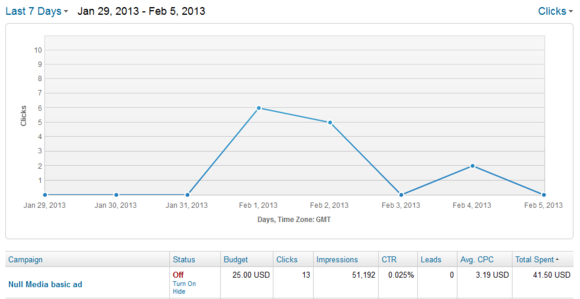
LinkedIn results.
The final tally: After four days, my ad had 51,192 impressions, 13 clicks, and a low 0.025 percent clickthrough rate. My total spend was $41.50 for a $3.19 average CPC. Take out the first CPM-ad day, and the clickthrough suffers—a net 0.019 percent rate—but the CPC of $2.36 (more than my bid, oddly) is more affordable. I never received any leads from LinkedIn, however.
The verdict: After my ad ended, LinkedIn emailed suggestions on improving my ad's performance. It said the site's "better performing ads" averaged a 0.02 percent CPC, so my ad actually seems to have been a pretty solid performer for LinkedIn, compared to those by other advertisers.
Twitter: Clickworthy yet costly
Twitter has just beefed up its ad analytics.
Setting up ads on Twitter is fast and painless. I submitted a single promotional tweet linking back to my home page, with a $25 per day budget and a per-click cost between a penny and $1.50.
My ad attracted two new followers.
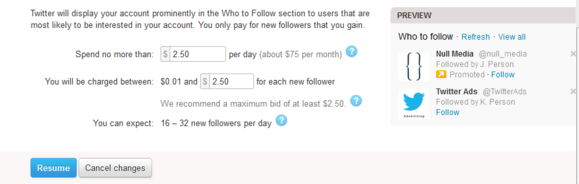
Twitter's fees are set dynamically, but the variability built in to the rate is confusing and disarming. My first click cost $1.30, but I'm not sure why, and Twitter doesn't do a good job of explaining how rates are set. However, Twitter did suggest that my ad might generate between 62 and 104 clicks per day. (I skipped the option to pay more to promote my Twitter account directly.)
My ads began showing up within minutes. There doesn't appear to be any manual approval process. Reporting is simple and straightforward.
Twitter results.
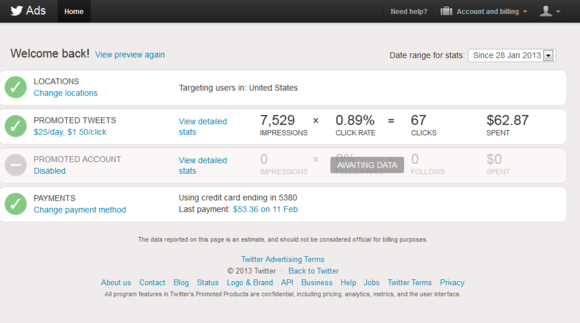
Ultimately, Twitter did not perform as well as promised. After four days, the ad received just 67 clicks, under a quarter of the 248 minimum clicks promised for a four-day run. The ad was promoted 7529 times, which works out to a great clickthrough rate of .89 percent. That's double the rate I got with Google AdWords, and at a CPC of 94 cents, it was the least expensive investment of the bunch on a per-click basis, too. (I also got two new followers on Twitter along the way.)
The verdict: The total expense of $62.87 is pricey for such a small number of impressions, but the clickthrough rate is still impressive.
StumbleUpon: Cost-effective without clickthrough
StumbleUpon's ad results were surprising.
At StumbleUpon you don't bid for impressions. Instead, you pay a flat rate to have your ad displayed to "stumblers" as they use the website. You don't write ad copy and you don't even have to rely on an ad being clicked upon. The page you're advertising just appears in the Stumble flow of users as they click along. Ad impressions cost a flat 10 cents each, an amazing bargain.
I paid $100 up front and set a $25 daily limit for my ad to be displayed to users with an interest in business topics, then submitted my Null Media home page for review. StumbleUpon's evaluation took about six hours, at which point my ad began displaying. (Make sure you submit each page you're advertising to the regular StumbleUpon system as well, because the ad reporting tool tracks both paid and organic Stumbles.)
StumbleUpon ads: A sleeper hit?
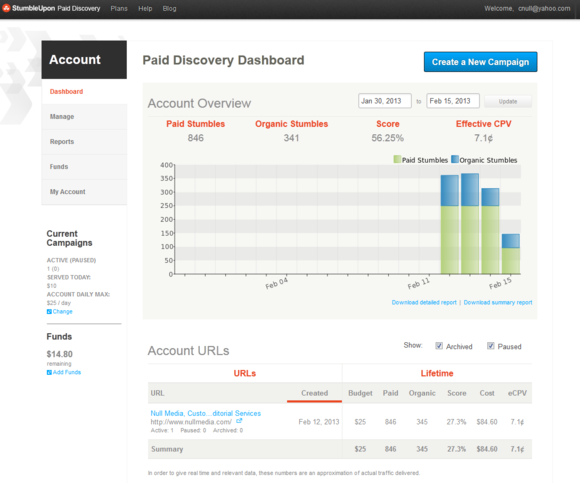
Because no bidding system or variability is involved, StumbleUpon's tracking is very straightforward. Over four days, my ad was displayed 1001 times (or 250 times a day at 10 cents each), and my website received a surprisingly high 397 organic stumbles on top of that. While I paid $0.10 per paid ad view, the "effective" cost per view including the organic stumbles was just $0.072 per view.
The verdict: These are very cheap ads, but the effectiveness of advertising a B2B service on a heavily consumer-focused service is also questionable. Click the Reports link under your Account profile to generate a more detailed look at who looked at your ad and for how long.
The takeaway
First, the results of this experiment are hardly scientific, given the small budget and limited amount of time. Plus, my ads targeted business buyers, not general consumers. A test of ads promoting a hangover remedy product or a novelty wristwatch would likely have yielded far different results. That said, here are the most helpful observations:
Facebook ads appear particularly ineffective at getting clicks, possibly because users have already become accustomed to ignoring these ad placements due to their location. Experiment with low CPC bids on Facebook when getting your feet wet.
LinkedIn is easily the most expensive service on which to advertise, and clickthrough rates are low.
Twitter's almost 1 percent clickthrough rate is double the rate of AdWords, and far and away the best I encountered. Ads are surprisingly cheap. It's difficult to target your ads on Twitter, but they still appear effective despite this limitation. Perhaps that's because promoted tweets are virtually impossible for users to ignore.
StumbleUpon is a great option for extremely inexpensive ads, and if you are targeting a broad swath of consumers, it's definitely worth a look.
If you're sold on social media advertising, consider these tips before you begin.
Start small. Set a very low budget for a CPC (not CPM) ad, and let it run for as long as you can to get a sense of how it's performing. Tweak the ad frequently and track your results. Some services let you run multiple versions of the same ad, so you can compare results among them.
Clicks aren't everything. Despite getting hundreds of clicks over hundreds of thousands of impressions, my business didn't net any new clients from these ads. Understand what value your clicks actually bring to you, and make sure your ROI is positive after you have sufficient history to examine.
Think about your target market. It's an old adage that "Twitter is for business" and "Facebook is for fun." My experimental results bore this out, so think carefully about what social networks your potential customers are likely to be using before charging ahead.
How I Tested
How effective is a social media billboard?
The budget for these tests was small and the timeline compressed, so consider these results to be anecdotal instead of scientific. It's impossible to run the identical ad across all social networks, but I tried to keep as many variables as consistent as possible. For example:
I allocated a maximum budget of $100 for each social network, to be split up over four consecutive days, $25 per day. (Most services did not use the full budget.)
I ran a baseline of four days of Google AdWords advertising, with the same budget, before running the social ads. I then shut off AdWords.
I designed all advertising to send traffic to the home page of my business, Null Media, and not to various social network profile pages, in order to better compare those results with AdWords' results.
I tested each social network consecutively, and ads were programmed so they did not overlap.
If an ad network did not use up its ad budget for a day (due to the vagaries of the way ads are presented and bid upon), I did not extend the length of the experiment. Shortcomings in budget expenditures are noted.
I tracked results using the services provided by each social media site.
When at all possible, I used both the same criteria for the desired viewers of an ad (such as location, demographics, and occupation) and the same ad copy and imagery.
I kept all social media accounts active by posting fresh content, two to three times daily, across each account. Some content linked back to the Null Media target domain; some did not.
By Christopher Null, Article source: http://www.pcworld.com/article/2030740/do-social-media-ads-really-work-we-put-them-to-the-test-.html
Data-mining is fast becoming the purpose of Facebook as Facebook is preparing to roll out hashtags on the giant social network, opening up another front in its intensifying battle with Twitter for people's attention, according to the March 15, 2013 news article, "Facebook hashtags? Annoying Twitter feature is data-mining." Facebook will have one more way to sell when it makes its announcement, according to today's news article, "Copying Twitter Hashtags Gives Facebook Yet Another Way to Sell."
Facebook is testing whether to follow Twitter's lead and allow users to click on a hashtag to pull up all posts about similar topics or events, reports the Wall Street Journal today in its news article, "Facebook Working on Incorporating the Hashtag." Catching up to Twitter and other rivals, the company will incorporate hashtags into its network, The Wall Street Journal reports. See, " Facebook to roll out hashtags, step up competition with Twitter."
Facebook is reportedly considering co-opting Twitter and following its previous aping of the Twitter model of following strangers and sharing content publicly. Each time you click on a hashtag, you'll see numerous other posts with the same tag. The goal is to show what's trending.
Then the most popular pages on social media can be tracked and used to generate more advertising money by studying demographics and popularity in trends. What goes viral can be a money-maker. To see what's trending in Facebook, follow the money as Facebook looks at what's happening with Twitter in the competition between the two social media giants.
Facebook is testing the idea of supporting the use of hashtags in posts to the social network, according to reports in The Wall Street Journal and other publications. Facebook has declined to comment on the reports. Hashtags first emerged on Twitter.
Many people not familiar with social media don't know how a hashtag is used presently or in the past, unless they're in the publishing or other media-related industry. Hashtags are preceded by a hash mark ("#"). They're used because they can be tracked and aggregated on Twitter as they would presumably be on Facebook, if Facebook decides to use them. Twitter shows which tags are trending.
Hashtags will be used Facebook if it decides to use them as 'vectors' that point direction to advertisers of what's trending online as most popular social media
When you have a device that points direction (a vector), then advertisers can pay to promote their own hashtags alongside Twitter's list of most common hashtags, if Facebook incorporates the use of hashtags.
Pages that show the most posts, and therefore the greatest 'trends' linked to a particular hashtag means that advertising can make more money on those pages. Just follow the money by following the trend popoularity. That becomes the direction or 'vector' advertisers follow.
On Facebook, advertisers could hypothetically "promote" user posts that contain particular hashtags just as they now promote "likes" of their business pages, notes the March 15, 2013 CNN news article by Ryan Tate, "Copying Twitter hashtags another way for Facebook to make money."
Promoted posts could receive longer and more prominent placement on Facebook's News Feed
If you look at the more numerous non-promoted items, they're simply sorted by relevance. It appears that mostly the highest trending pages would get attention through prominent placement because the pages are emphasized and promoted more when they're trending or more popular than the importance of the information to making the world healthier, more peaceful, or more sustainable in many instances.
The reason is as you follow the money, the popularity goes to the sites that go more viral in how many people pay attention to them. Yet, if people don't know they exist because they're not prominent or promoted, they won't get the chance to know how valuable the information could be to individuals who need the information to thrive.
It's as if more attention is paid to the lives of celebrities than to the latest discoveries in medicine, technology, or education. Celebrity, royalty, or very wealthy people's choices in diets, fashions, or health solutions usually trend higher in popularity than choices by scientists, teachers, or librarians. How hashtags generate money is through advertising on the most popular pages online.
People usually follow the rich and famous or the most heavily promoted and prominent rather than the quietest information resources or databases online, even though those pages may have the most current information waiting for the media to broadcast. Facebook and Twitter appear to attract similar social media audiences. Which one will attract the most readers in the near future?
The 'war' between Facebook and Twitter in the tech press
Competition between Twitter and Facebook is viewed by the media as a 'war' between Facebook and Twitter that's framed in the technical media. On one hand, Facebook is vying and competing vigorously for the attention of its users in order to generate more money from its advertisers.
If you follow the money, the outcome is predicted to be whatever will have the greatest ability to grow more advertising dollars. That's the only way to make money in social media--by keeping and adding paying advertisers on the Facebook pages, or for Twitter, on the Twitter sites. Hashtags will be one more way to track the trends.
By Anne Hart. Article source: http://www.examiner.com/article/facebook-considers-using-hashtags-like-twitter-does-to-follow-the-money
I wonder if Google+ will always seem like the newcomer in town. They’re kind of like someone who moves into a small town – 10 years later, people will still be referring to them as the new family.
But seriously – so many people are still sitting back and wondering “if” they should join Google+. People are even angry, it seems, that they have to learn one more thing.
While the speed of change has certainly increased with social media, I’m surprised that people seem to take it so personally when a new network comes out or one of the existing platforms makes a change. I mean – if you don’t want to keep up with it all, you have choices! Either stop using it (and take the risk that you will slowly go out of business) or do some homework and find an outsourcing solution. But you don’t have to be miserable every time there’s a change!
Just sayin!
I honestly think that anyone dragging their feet on Google+ is bound to lose out. With the way that Google is connecting social media to so many other apps, to search itself, this is another development that will forever change the way we seek and find information online. Honestly – I think this has all of the characteristics of being big – maybe even as big as the emergence of social networking itself.
But since there are so many who don’t understand how to use Google+ at all – much less how to use it to increase your business, I wanted to talk about a few of the ways that Google+ can help you connect with prospects and customers, boost your business and increase your bottom line.
1. Complete your profile
This is your first step to using Google+ for business and maximizing the profits you might earn as a result of this network. Without a complete profile, people will not inherently trust you as someone to do business with. You’ll look like you don’t care about your own business – so why should people trust you with their work? And, you’ll miss out on valuable networking opportunities if you don’t include things like your URL in the website section, or links to thoughtfully chosen landing pages in the “pages I like” section, etc.
2. Business Pages
Once you have created your personal profile, take a moment to create your business page. It is so easy to forget to do this, but even if you’re branding yourself rather than a larger business with a different name, there are certain features of business pages that aren’t available on personal profiles. You can create as many business pages as you want to, and you can custom target your marketing efforts to various segments of your niche.
3. Communities
Google+ communities have taken off since they were introduced! Anyone can create a Google+ community, and this is a fantastic way to network as well as to establish yourself as a thought leader in your industry. Be sure to be an active, respectful and polite participant to get the most use out of this feature.
What are some other ways you’ve used Google+ to boost your business? Leave a comment below – I’d love to hear!
By Kim Garst, article source: http://drmommyonline.com/google-profits-how-to-use-google-to-make-money
Social media sites are receiving millions of visitors on a daily basis. Because of this fact, there are now a lot of online marketers who are using social media to help them grow their businesses. Social media users might have heard of these successful marketers who are earning a huge amount of money by just using social media. Perhaps, you have heard of them too and maybe, you are wondering how they are making money. Want to learn how? Read on. There are actually a lot of ways to earn money using these sites and here are some:
Promote your own business. If you have a business, then the first step that you have to take in order to make it to the top is to promote it using your social media accounts. You can create different accounts on various social networking sites and then make use of their features to promote your business. Facebook, for instance, allows you to make your own page. You can create a page for your business, add your friends and their friends on the page, and then inform them about your business. Run promotions, host contents, offer deals and more.
Sell your products. Online shops are becoming popular these days because of the convenience that they offer. You can make use of your own social media accounts to sell your products. If you are using Facebook, you simply need to post the photos of your products, include their respective descriptions and prices and then wait for comments. You may also share them so that more people will be able to view them. On the other hand, if you are using Pinterest, you simply need to pin your products on your own board or on someone's board.
Advertise someone else's products. If you don't have your own business or products, then you don't need to worry at all because you can still make money and that is by advertising other's products. This is called affiliate marketing and it is very popular among marketers. The truth is, there are a lot of people who are generating a decent income using affiliate marketing and if you are really determined, you can be like them. Of course, you have to know the ins and outs of affiliate marketing so that you can succeed.
Social media is not only for personal satisfaction, but it can also be a way of earning money online. Take advantage of the ways mentioned above and start making dollars.
Why you need to have more followers on Twitter? Simply because this number is an indicator!
Some social media savvies think that numbers doesn’t matter if it’s just numbers, what’s the benefit of having 1000s who are following you on Twitter if you don’t actually know them or engage with them.
Some other people have a different opinion. They don’t see the Twitter followers number as whatever number - they can see what’s beyond that; they can see the business opportunity in the followers number.
You see, my blog gets a lot of traffic from Twitter, I actually make money from Twitter. The number of Twitter followers is important in my case! Anyway, who hates to have a lot of followers on Twitter!
In my personal experience, you won’t be able to engage with 1000s of people that are following you on Twitter. I am here assuming all of people who follow you are actually engaging with you on daily bases (this is why businesses hire social media managers).
If your case is different, here we talk about small level of interaction and engagement, with some little management you actually can engage and make use of that number. Twitter is very powerful if you focus on it!
How to increase your targeted Twitter followers fast?
I bet you would look for an easy and working way to increase your targeted Twitter followers fast. One of the secrets that I can share with you is as follows
follow some targeted people in your niche every day;
some of those people will follow you back;
after a few days flush away (unfollow) those who have not followed you back.
In this way the more you follow, the more you get people to follow back. Hence, you will increase your targetted twitter followers fast.
That is why I recommend using a Twitter management tool like Tweetadder.
TweetAdder
TweetAdder is probably the best Twitter management software out there. It’s a fast and easy way to automate Twitter promotion and Marketing. Here are some things you can do with it:
Laser Targeted, Global Twitter User Search Tools
Multiple Twitter Account Management
Full menu of Auto Follow and Auto Unfollow Benefits
Full History of Followers and Following
Powerful Automated Tweet Posting and Direct Messaging
Twitter Current Trends and Historical Trends Research
The good thing is TweetAdder has a demo version with full functionality! Try out Twttet Adderby setting up the demo version of their application. The Tweet Adder demo is fully functional and has all features of the full version. However it’s only limited by using a single twitter account and limited number of follows, unfollowes, tweets and messages. After all, it will be a good start!
 I’m seeing companies spend lots of money trying to get customers to talk about their brands and products in social media.